Friction (Friction)
Friction in UX design slows users down - learn how to identify and eliminate unnecessary friction to optimize conversion rates.
What is Friction in UX Design?
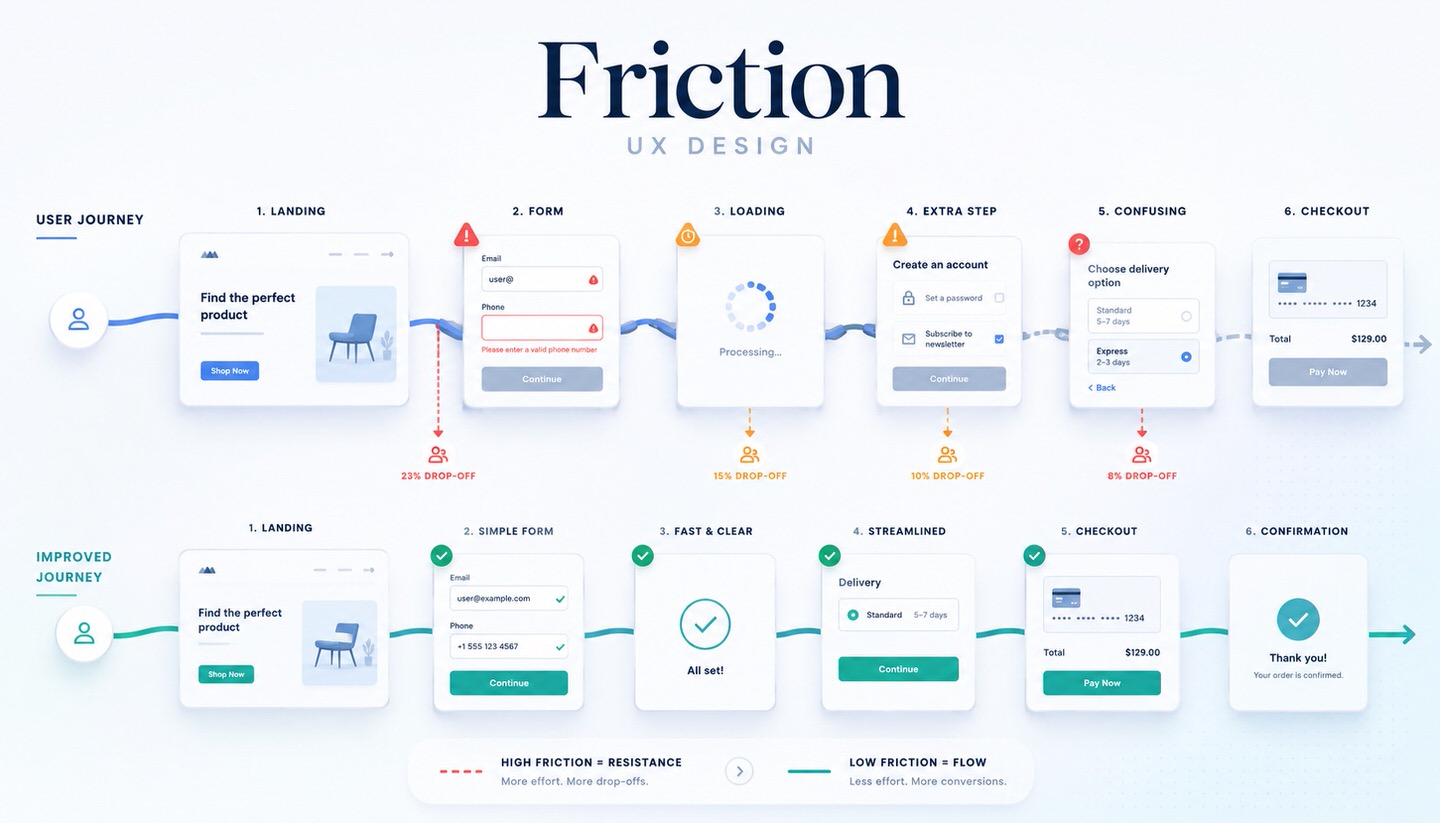
Friction (known as "Reibung" in German) in UX design refers to anything that makes it harder, slower, or more frustrating for a user to achieve their goal on a website or in an app. Every unnecessary click, every superfluous form field, every ambiguity, and every delay creates friction. Simply put, friction is anything that stands between the user and their goal and hinders a smooth path to it.
In online marketing, friction is a key topic because it directly determines whether visitors complete a desired action or abandon it out of frustration. Any friction at a critical point can mean losing potential customers.
Where Does Friction Occur?
Friction can appear in many places on a website. Common sources include:
- Complicated forms: Too many fields, unclear input requirements, or confusing error messages.
- Too many steps: A cumbersome process with unnecessary intermediate steps to reach the goal.
- Slow loading times: Waiting times that cause impatience and abandonment.
- Unclear user guidance: When it’s not clear what the next step is or where to find something.
- Forced registration: For example, when a purchase is only possible with an account instead of allowing guest checkout.
- Unexpected hurdles: Hidden costs, surprising conditions, or technical errors.
- Distractions: Too many competing elements that divert attention from the actual goal.
The Different Types of Friction
Friction can be categorized by its cause, which helps in targeted elimination:
- Cognitive friction: Mental effort. The user has to think, search, or understand how something works. Caused by ambiguity and poor structure.
- Interaction friction: Physical or handling-related effort. Too many clicks, inputs, or steps.
- Emotional friction: Doubt, distrust, or uncertainty. For example, when a site appears untrustworthy or the user fears making a mistake.
Friction Isn’t Always Bad: "Good Friction"
An important and often overlooked point: Not all friction is harmful. The goal is not to eliminate every form of friction but to remove unnecessary friction. Some friction is intentional and useful, known as "good friction." Examples include a security prompt before permanently deleting data ("Do you really want to delete this?") or a confirmation before an important, irreversible step. This deliberate friction protects users from mistakes and builds trust. The art lies in removing obstructive friction while strategically using protective friction.
What Are the Consequences of Too Much Friction?
- Abandonment and bounce rates: Frustrated users leave the site before reaching their goal.
- Lower conversion rate: Any friction in the conversion path reduces the percentage of visitors who complete the action.
- Poorer user experience: Friction worsens UX and leaves a negative impression of the brand.
- Indirect SEO disadvantages: High bounce rates and poor user signals can have a negative impact over time.
How to Reduce Unnecessary Friction?
- Streamline forms: Only ask for the absolutely necessary fields. Every omitted field lowers the barrier.
- Reduce steps: Make the path to the goal as short and direct as possible.
- Create clear guidance: Use unambiguous calls-to-action and a logical structure that leaves no doubt about the next step.
- Improve loading times: Fast pages reduce one of the most common sources of friction.
- Offer guest options: Allow purchases without mandatory account creation, for example.
- Build trust: Transparent information, quality seals, and reviews reduce emotional friction.
- Analyze bottlenecks: Use tools like heatmaps and conversion path analysis to identify where users drop off and address those points specifically.
Conclusion
In UX design, friction refers to any form of resistance that prevents users from achieving their goal smoothly, whether through complicated forms, too many steps, ambiguity, or distrust. Since unnecessary friction leads to abandonment and a lower conversion rate, reducing friction is a key lever in conversion optimization. The important distinction is that not all friction is bad. Protective "good friction," such as security prompts, is useful and should be retained. By consistently removing unnecessary hurdles from the user’s path while providing guidance and trust at the right points, you ensure a better user experience and guide more visitors to their goal.